
Accessible Trade Terminal: a detailed update
It's been a minute since I posted about my programming ventures. The last time I wrote about the terminal was back in August. When I lock in on a task, I fixate until it's done. That's not an excuse for going quiet, but it is the reason.
And it's been for good reason. Since that August post I've put out ten releases, 2.4 through 2.13, and there are close to seven hundred changes in the code since then. 2.13 is the newest, and it's out now. Alongside the bug fixes and new features, most of my attention for the last month has gone to one thing: rebuilding some very popular, very closed-source trading indicators from the outside, by measuring what they do until mine do the same thing.
No doubt some of you have seen that a developer used AI to reverse engineer free, open-source versions of essentially the whole Adobe suite, Photoshop and Premiere included. I'll be writing a separate post about where I think innovation, technology and plain old value are headed over the next decade. For now, let me tell you what I've brought to the blind trading table.
For anyone new here: the Accessible Trade Terminal is charting and trading software built for blind traders. You arrow through a chart and hear its shape as sound, speech fills in the numbers, a braille display gives you the text, and a Dot Pad lets you feel the drawing itself.
The everyday improvements
Let's start with the general updates, the things you'd notice in a normal day of using it.
New places to trade. I added Hyperliquid, which my international users kept asking for, and Kalshi, which now offers perpetual futures on crypto, US stocks, metals, oil, currencies and indices, all in US dollars and regulated by the CFTC. Coinbase's US futures are in too, and Kraken now shows your real balances and each pair's real minimums and leverage. A couple of things worth knowing: Hyperliquid isn't open to traders in the US or Ontario, and Kalshi is turning on perps for its members a few at a time, so the terminal checks your key and tells you whether yours has them. When you trade on Hyperliquid, the terminal uses a wallet that can trade but can't withdraw, so it can't move your money out even if it wanted to.
One honest note: these new venues are brand new. I haven't put an order through any of them yet, not with real money and not on a demo account either. That goes for the order checks I rewrote on the older ones too. Everything has been checked against the exchanges' own published answers, but that isn't the same as a real order going through, so treat them that way. Paper trade first, then the exchange's practice account, then real money in small sizes. Hyperliquid's and Kalshi's practice modes run on their own test venues.
Orders that do what they say. A trading app that's sloppy with orders is worse than no trading app, so a lot of the work went here.
- A stop loss can no longer flip into a new position the other way.
- Some exchanges (Bitstamp, Coinbase, Gemini, Kraken Futures and MEXC spot) can't attach a stop to an entry order. The terminal used to send the entry anyway, without its stop. Now it refuses the order and tells you why. That's the kind of bug that costs real money, and I'm glad it's gone.
- Moving a stop on the Positions tab used to play the error sound and announce that your position "may be unprotected." It was a false alarm, but the edit could also quietly cancel your take profit. Both are fixed.
- Every crypto exchange now checks each market's rules before an order goes out, and leverage is either exactly what you asked for or refused in plain words.
- I fixed six order problems that only showed up when you trade across several tabs and exchanges at once. You can also close part of a position at a limit price, and size an order by its dollar value.
Hearing the chart.
- The Windows app speaks again, JAWS is supported, and the terminal tells you when it can't speak rather than sitting there silent.
- Braille and Dot Pad support is actually in the download now.
- Every oscillator gets its own pane, Alt+Page Up and Alt+Page Down move between panes, and Shift+F1 names the pane you're actually in.
- When a candle closes you now hear when the new one opened: "New bar: Open 75,712 at 14:33."
- When you arrow through an indicator, you only hear the part you're on. Sitting on Cipher A's green dot, you no longer hear the yellow diamond on the same candle talking over it. If you liked hearing everything, there's a setting to bring it back.
- Times can be read in UTC or on a 12-hour clock with AM and PM. It's on the Speech tab in Settings (F12).
- Any timeframe you type now loads. If an exchange doesn't offer 8-hour candles, the terminal builds them from its 4-hour ones instead of switching you to something else.
- Candle patterns follow the textbook rules and say which way they lean, and chart formations are named on the bars where they start and end. Where formations overlap, semicolon and Shift+semicolon pick between them, and it tells you which bigger formation the one you're on sits inside.
- Each part of a volume profile has its own tone. The point of control is a high chime, the value area sits in the middle, and the empty stretches are low, so you can hear where the volume is without reading a number.
- The drawing tools grew up: Fibonacci levels that behave like TradingView's, the pullback found for you, five pattern tools, and alerts on the lines you draw.
- Indicators work on Heikin-Ashi candles, while strategies still trade the real prices.
- Alpaca's US stock list used to silence the screen reader. It doesn't anymore.
- Save and Load workspace now ask what you want. Save all your tabs or just the one you're on, and load a workspace over your tabs or next to them. If loading would close a chart you have open, it tells you which ones first.
I also took a couple of things out. Spider Lines was really just eight moving averages under a misleading name, and Loukas Cycle Detection is covered by the cycle indicators below. If a chart of yours had either one, it opens without it and tells you once.
The star of the show: the Cipher indicators
This is the part I'm proudest of, because it brings some of the most popular indicators in crypto to blind traders for the first time.
Market Cipher is a paid indicator package from a crypto content creator known as CryptoFace. It's built to help you read momentum and trend at a glance, and it works on any market and any timeframe. It's really four indicators:
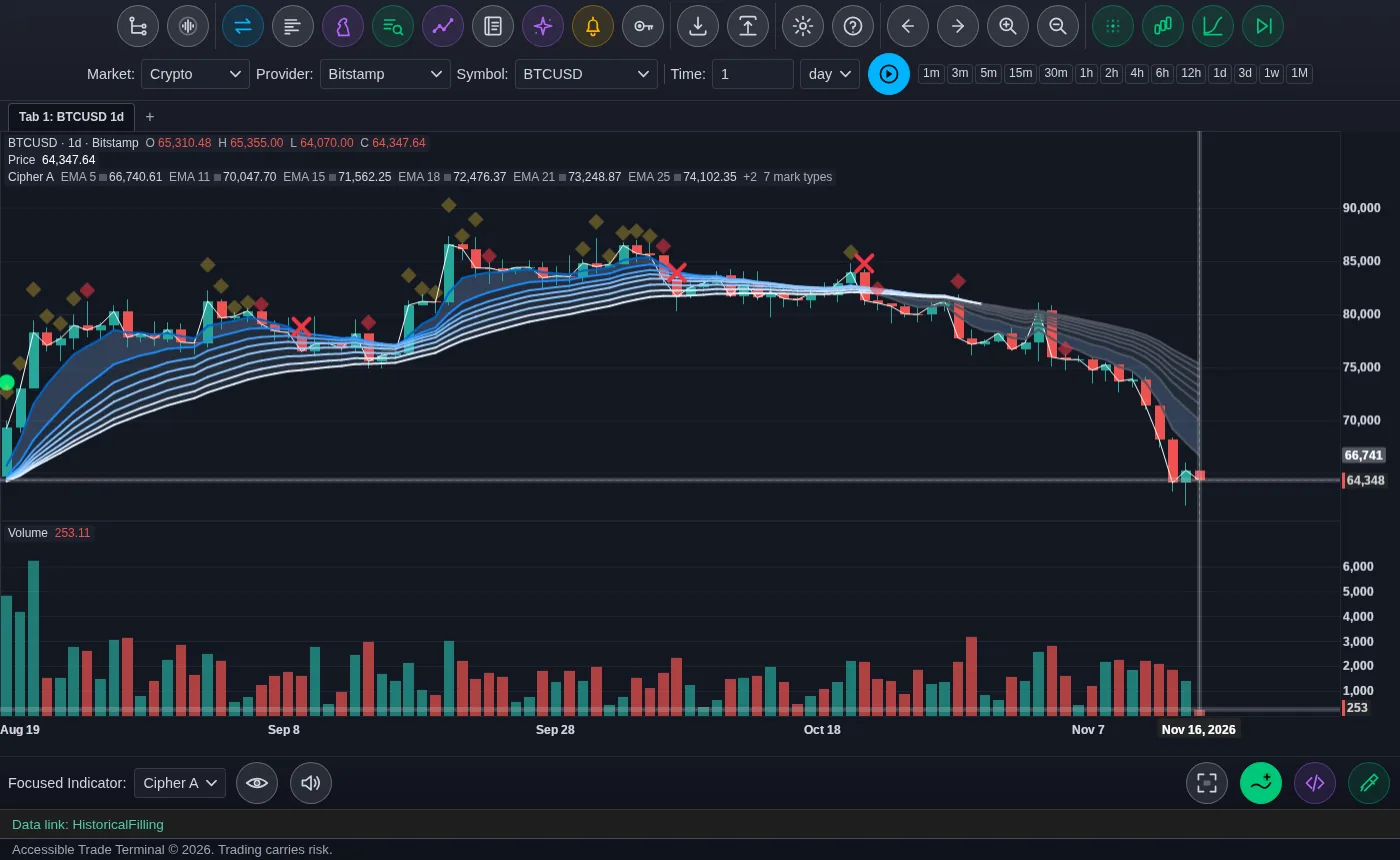
- A sits on the price chart and drops symbols where momentum turns.
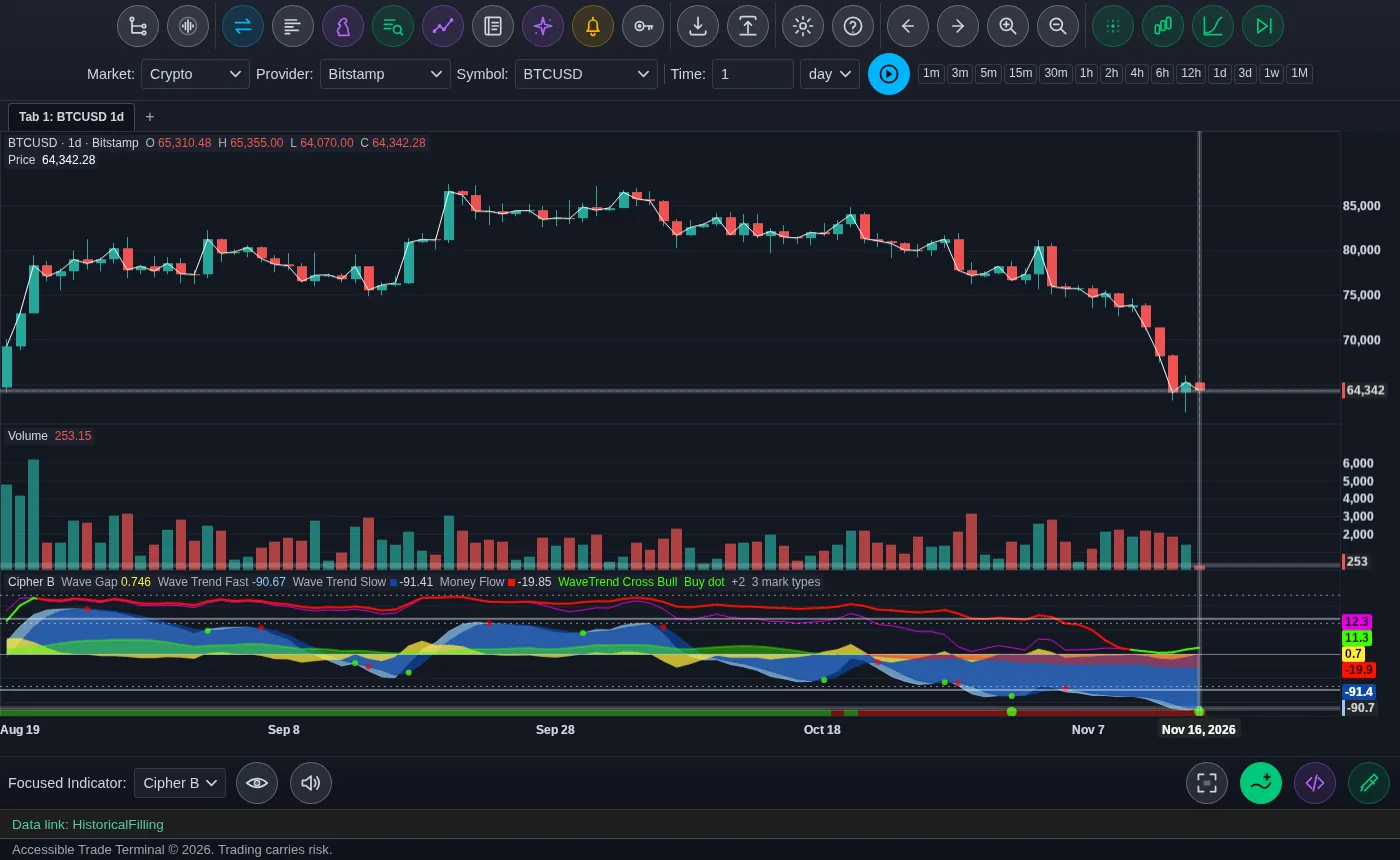
- B is the oscillator underneath: the waves, the money flow, and the buy dots everyone posts screenshots of.
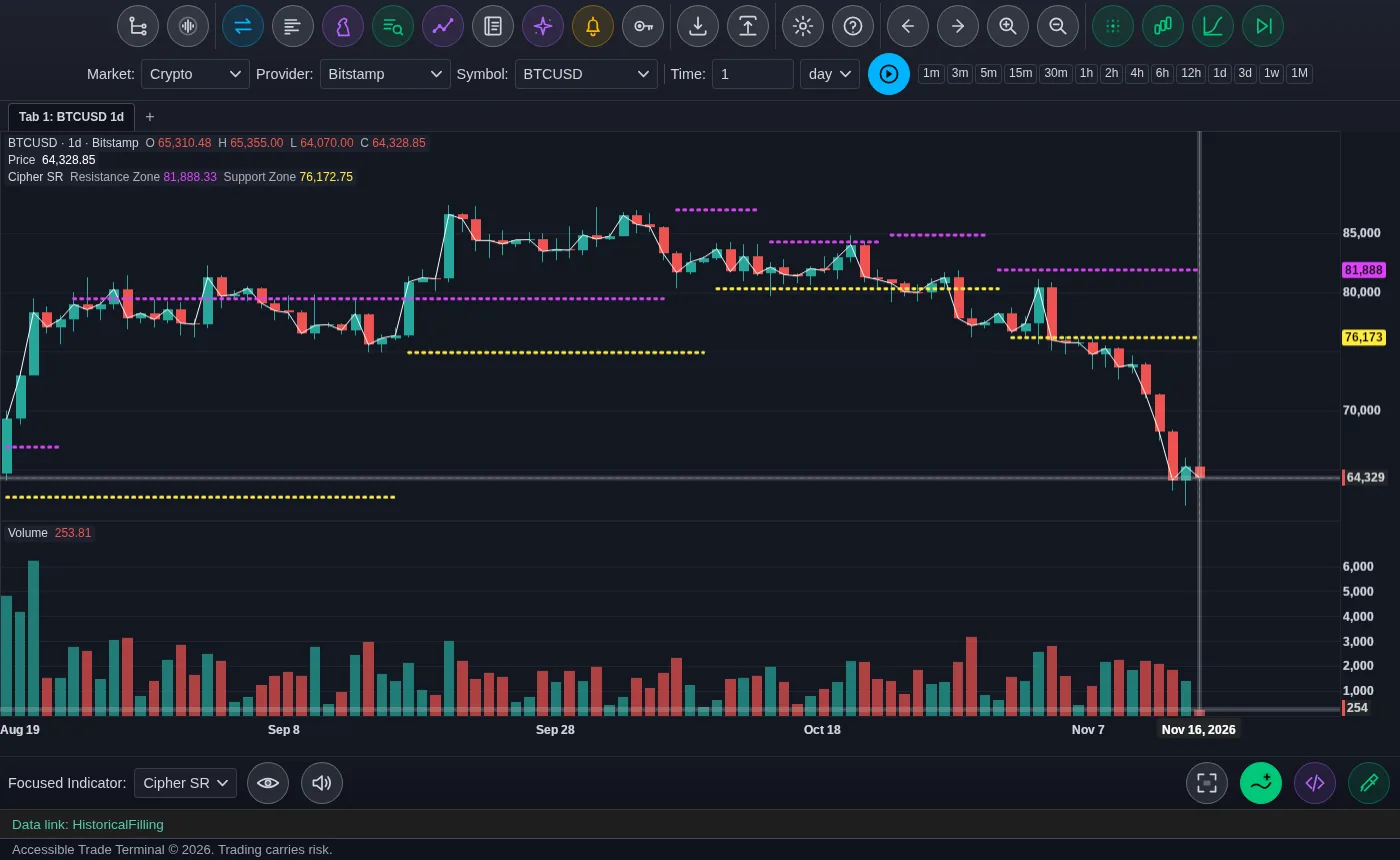
- SR draws support and resistance levels.
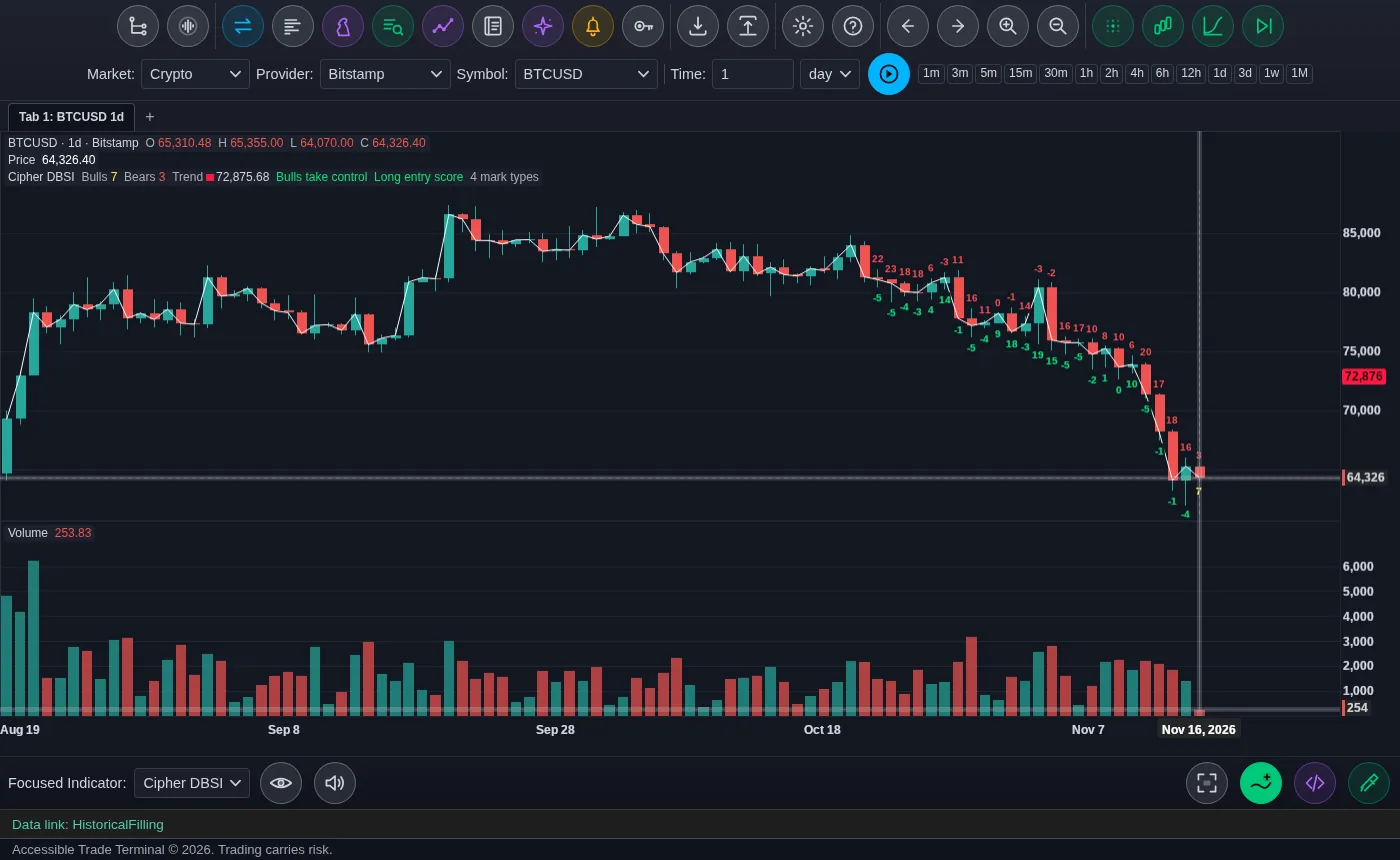
- DBSI scores how strong the bulls and the bears are.
Here's what each one looks like on a Bitcoin daily chart.
There are free lookalikes on TradingView, the best known being VuManChu's Cipher B, built on LazyBear's WaveTrend indicator. But the real package is closed. Nobody outside it knows exactly how it's calculated.
So I did it the slow way. I took the real indicators' own plotted values and checked mine against them, bar by bar, until they matched. Cipher B's money flow now matches Market Cipher B's exactly, and Cipher A, B and SR were each corrected against Market Cipher's own numbers. DBSI was the hardest, because its scoring is hidden. Mine currently lands exactly on about 19 bars in 20, and where prices go flat it warns you that its number may be off by two. Those slight differences come down to TradingView oddities rather than the scoring itself. So all four match the originals: A, B and SR exactly, and DBSI essentially identical.
Matching the math was only half of it. I also had to make it make sense by ear. In the original, Cipher A's signals are shapes: a green dot, a blue triangle, a red X, a "blood diamond." A shape name tells a blind trader nothing, so in my version each one says what it means: Trend Turned Up, Early Turn Up, Bullish Conditions, Short-Term Turn Down, Momentum Turned Down, Strongest Sell Warning, Oversold Trap Warning.
While testing, I noticed two different signals were both announced as "red diamond." I asked whether they were really different shades. They aren't. They're the same red, but one is drawn see-through and smaller. Sighted traders tell them apart by how solid it looks. The terminal now says "faint" for anything drawn see-through, so you hear "large faint red diamond" against "large red diamond." I'm told it looks right.
Cipher B is built to be heard as well. Its waves play clean in the normal range, pick up a soft noise past 53 and a louder one past 60, so you can hear when a market is stretched without stopping to read a number.
To try them, log in to the hosted terminal, open a chart, press Alt+A, and search for Cipher A, Cipher B, Cipher SR or Cipher DBSI. There's no separate subscription, and no sighted helper reading the dots to you. I'll be publishing more posts on the math behind Cipher B soon.
Now the honest part, before anybody goes all in on a green dot. I test signals the way I test everything in this terminal: I write the test down before I run it, run it across years of stocks and crypto, and check it against plain chance. The Market Cipher signals came back with no edge. Used on their own, they didn't beat chance once the statistics were done fairly. When my versions matched the originals exactly, I ran the tests again and got the same answer. That doesn't make Cipher useless. It's a very good way to read momentum and see when a market is stretched, which is exactly why so many traders love it. It's a lens, not a money printer. That's also why strategies are hard to build. So much of trading is deciding whether to get in or stay out, and no indicator makes that call for you. I said in August that the terminal ships tools, not opinions, and that hasn't changed.
To be clear, the terminal isn't affiliated with Market Cipher. Cipher A, B, SR and DBSI are my own builds, made to behave like the originals.
Cycle lows: Cipher C and Cycle Position
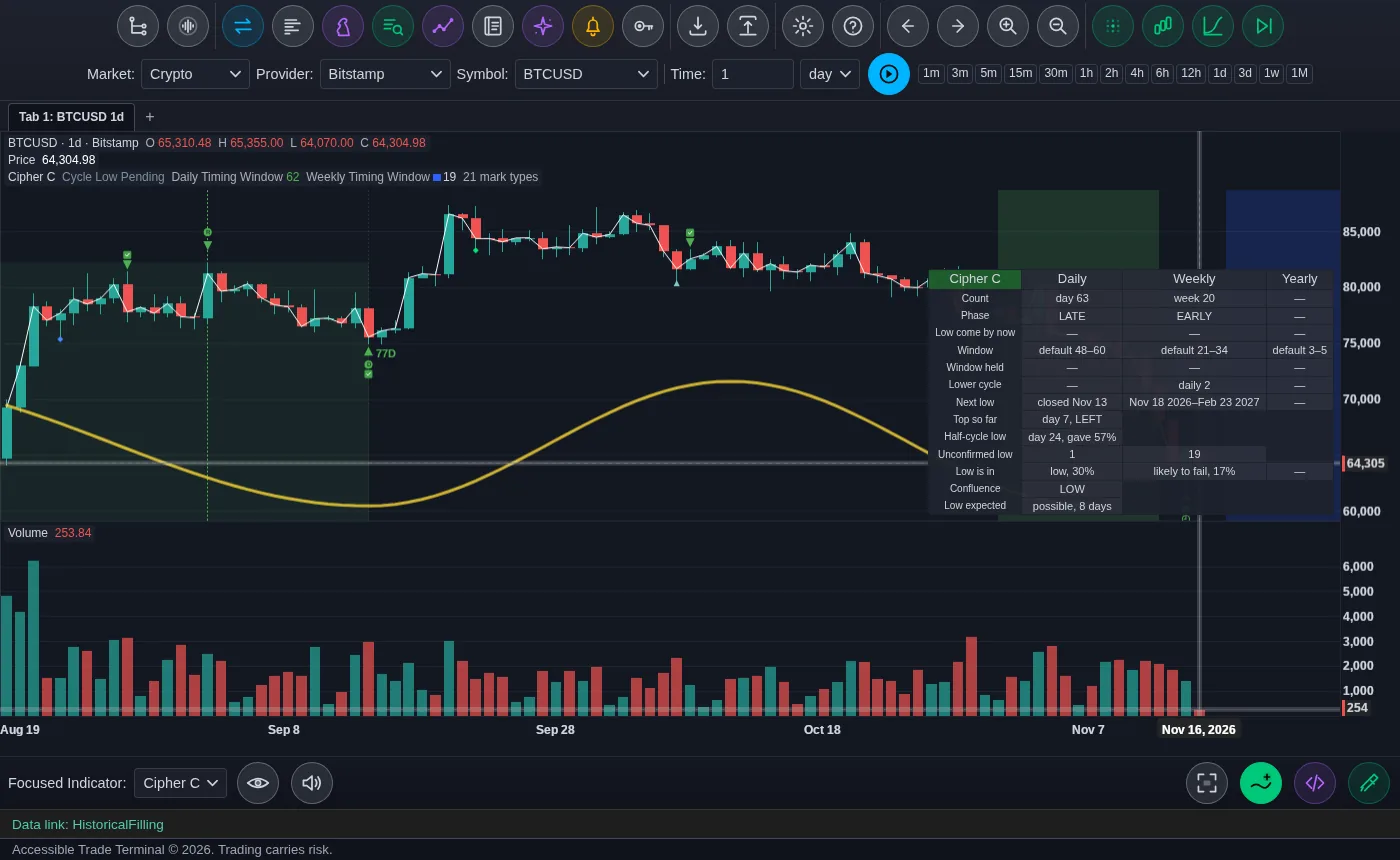
Another very useful indicator is Camel Finance's CF Cycle Trading Indicator. It keeps track of market cycles: the daily, weekly and yearly cycle lows, and whether each cycle topped early, in the middle or late, which cycle traders call translation. A late top is usually a healthy cycle. An early one is a warning.
I built two versions. Cycle Position is my copy of Camel's indicator. It picks the same daily low on the same bar as the original about 19 times in 20. Cipher C is my own take on it. The biggest difference is honesty about timing. The original gives you a narrow window for the next low that, in my testing, catches it about 3 times in 10. Cipher C gives a wider window, learned from each market's own history, and it holds about 6 times in 10, which is exactly what it says it will do. It also says "Low is in" and "Low expected" in plain words, gives you the dates of the next window when a low is due, finds the half-cycle low, and warns you when a cycle fails. Despite the name, Cipher C has no relation to the Market Cipher package.
Why this matters to me
The Accessible Trade Terminal really is opening a door that was closed before. Most of the accessible graphing tools I know of, like Desmos, are built around math problems. As far as I know, no other tool brings complete trading, charting and technical analysis to people who are blind.
I'll keep saying it: the system, meaning the way society is structured and how blind people have to navigate it, isn't designed for our success. If most of us keep waiting for state agencies to pull up and save the day, we'll never get anywhere.
True independence isn't just about how clean you keep your house, how well you cook, or how far you can walk to your destination, though all of that matters. The real measure of independence is financial freedom. We as a demographic have been held by the proverbial balls forever, and a big reason is that we need tools. Those tools are expensive, we make so little, and the only way to get them is usually to partner with a state agency.
And it isn't as easy as saying "I need this equipment." You have to agree to go back to school or get a job, maybe a job you aren't qualified for. You might simply want a braille display to read books. That's not a good enough reason for an agency. If you can trade the markets and keep what you earn, you can cut the agencies out of the picture and buy what you need, when you need it. That's the real power of being independent.
I know this message won't land with everyone. Some folks will say it would put a lot of vocational rehabilitation counselors out of work. Others will say trading carries risk. It does. But just about every way of making money carries risk, and none of it is easy. I'd rather make mine on my own terms than fight with a company that doesn't know the first thing about accessibility or accommodations, and hope they don't lay me off a month from now. I don't need to be the token hire. And let's not get started on Social Security, because I could go on for days.
Try it yourself
The easiest way in is the hosted terminal at accessibletrader.com/terminal. Create an account and log in. It's paper trading, so you practice with pretend money while you learn, and it already has the Cipher indicators. If you want to trade your own accounts, download the desktop app from accessibletrader.com. The Ciphers and the new exchanges are in the download as of version 2.13, which is out now.
I'm also starting a series of tutorials on my YouTube channel: how to use the terminal, trading basics, and the math behind these indicators. Paper trade first, place a few practice trades, and learn how it sounds when a market turns. I promise you, with discipline and a little patience, you can do this.
Comments (0)
No comments yet.